How Website Speed Affects Search Rankings
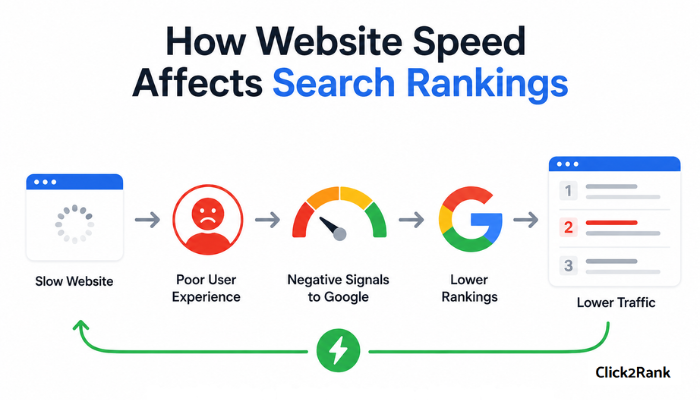
Website speed affects search rankings by influencing both user experience and the signals search engines use to evaluate page quality. When a site loads slowly, it can make it harder to rank as well as faster competitors.
It’s one of the most common problems we see at Click2Rank: traffic dropping for no obvious reason, until you check the load times. So we put this guide together based on what we’ve seen work across real audits.
You’ll learn:
- What page speed means for your search rankings
- How Google measures speed through Core Web Vitals
- What’s slowing your site down and why does it hurt traffic
- How to audit and fix your site’s speed issues
Let’s dive in.
Does Page Speed Really Affect Search Rankings?
Yes. Google confirmed page speed as a ranking factor back in 2010, and it hasn’t loosened its grip since. If anything, it’s gotten stricter.
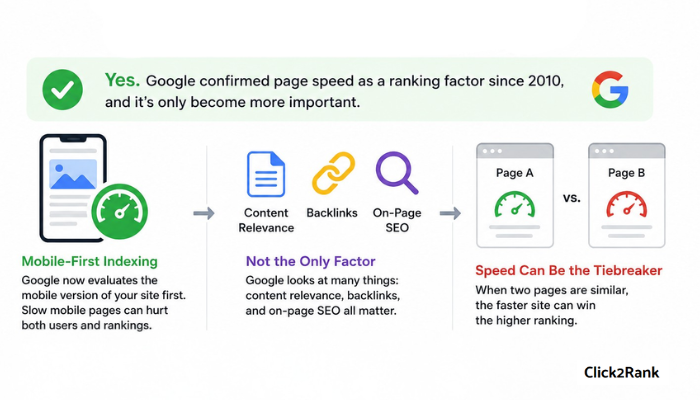
When mobile-first indexing rolled out, Google shifted to evaluating the mobile version of your site first. As a result, issues that slow down mobile pages became harder to ignore from both a user experience and SEO perspective.
That said, page speed isn’t the only thing Google looks at. Content relevance, backlinks, and on-page SEO all play a role in search results. But when 2 pages are competing for the same spot, site speed can be the tiebreaker.
For competitive keywords, that gap can be the difference between page one and page two.
Core Web Vitals: The Metrics Google Uses to Measure Speed
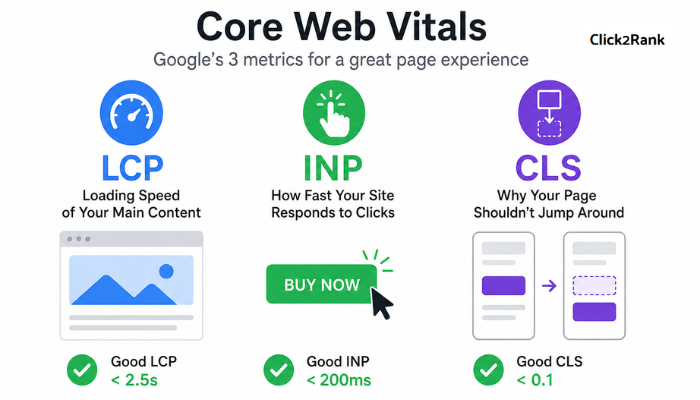
Core Web Vitals are the specific, measurable signals Google uses to evaluate real-world page experience. As of 2026, there are three: Largest Contentful Paint (LCP), Interaction to Next Paint (INP), and Cumulative Layout Shift (CLS). We cover them in detail below.
LCP: Loading Speed of Your Main Content
LCP measures how long it takes for the largest visible element on your page to fully load. That’s usually a hero image, a large block of text, or a banner.
To assess whether that load time is acceptable, Google’s Core Web Vitals guidelines define a good LCP score as anything under 2.5 seconds. Beyond that, visitors may be left waiting for the page’s main content to appear.
INP: How Fast Your Site Responds to Clicks
After a user clicks, taps, or types something, INP tracks how fast your page reacts to that input. It replaced FID (First Input Delay), which Google retired in 2024.
Unlike FID, INP measures a wider range of interactions across the entire user experience. A good INP score sits under 200 milliseconds. Lag at that level is subtle, but users feel it, particularly on mobile.
CLS: Why Your Page Shouldn’t Jump Around
Think of a button that moves just as you’re about to tap it. That’s a CLS problem, and it’s one of the most overlooked web performance issues out there.
Google recommends keeping your CLS score below 0.1, which means page elements should remain stable as the page loads. When layouts shift unexpectedly, users end up clicking the wrong thing entirely.
Together, these three metrics show whether a page loads quickly, responds promptly, and remains visually stable.
How Slow Speed Hurts Rankings (and Revenue)
Google research shows that 53% of mobile users abandon a page that takes longer than 3 seconds to load. That’s more than half your mobile visitors gone before your page finishes loading.
Beyond the immediate loss of visitors, slow pages also make it harder to compete in search. Google considers page experience alongside many other ranking signals. So a site that performs poorly may struggle to keep pace with faster competitors when other factors are similar.
The revenue side is just as direct. Slower load times mean fewer pages visited, less time on site, and lower conversions. For ecommerce businesses, particularly, a 1-second delay in page load time directly affects how many visitors complete a purchase.
In fact, we’ve seen sites that cut load times by even 1–2 seconds achieve a 10–20% lift in conversions, depending on the industry.
Technical SEO Factors That Slow Down Your Site
Site speed is the cumulative result of several technical SEO elements working together (or against each other). When even one of these is misconfigured or overloaded, it can slow your entire site down. The most common ones are:
- Image Optimization: Large or uncompressed images are one of the most common causes of slow load times. Modern formats like WebP or AVIF, proper compression, and responsive sizing can significantly reduce how much data the page needs to load.
- Render-Blocking CSS and JavaScript: CSS files and JavaScript resources can block a page from loading until the browser finishes processing them. The more of these files stacked at the top of your HTML, the longer users wait for the first visible content.
- Slow Server Response (TTFB): Time to First Byte measures how long it takes the server to respond to a user request. A sluggish server means everything that loads after it.
- No Caching or CDN: Without caching, your server has to rebuild the page from scratch on every visit, which slows down response times. A content delivery network (CDN) helps solve this by storing copies of your site across multiple global locations, so users in Sydney and Seattle can load the same page quickly.
- Too Many Third-Party Scripts: Analytics tools, chat widgets, and ad trackers each add extra requests the browser has to process. Individually small, these delays build up quickly when several scripts run on the same page.
But when several stack up on the same site, the combined effect can slow load time. The only way to understand what’s affecting your site is to run a speed test.
How to Audit Your Site’s Speed (Free Tools Included)
Before prioritizing fixes, you need a baseline. These tools are standard in any technical SEO audit:
- Google PageSpeed Insights: This is the most direct place to start. It scores your page on both mobile and desktop, flags specific issues, and hands you a prioritized list of what to fix first. Since it comes straight from Google, the recommendations map directly to what the algorithm actually weighs.
- GTmetrix: If PageSpeed Insights tells you what is slow, GTmetrix shows you why. The waterfall report, a step-by-step visual timeline of every resource your page loads, breaks down each file in the exact order it loads. That way, you can pinpoint the render-blocking files and oversized images holding everything else up.
- WebPageTest: Useful when you want to test from a specific location and device type rather than a generic server. Results include first-byte timing, visual load progression, and a full breakdown of every request your page makes. This helps you understand how your site performs for real users in different regions.
We recommend starting with PageSpeed Insights if you’ve never audited your site before. It’s the fastest way to identify your biggest issues before going deeper with the other two.
High-Impact Speed Fixes to Try First
For teams with limited developer time, sequencing matters more than trying to fix everything simultaneously.
Start by compressing and converting your images to modern formats like WebP, then track down your biggest LCP delay. In most sites we audit, an oversized hero image is the culprit.
Next, look at infrastructure. Enable browser caching and a CDN if they aren’t already in place, and go through your third-party scripts one by one. Remove anything non-essential. A CDN alone can cut load times by 30–50% for users far from your origin server.
Once the infrastructure changes are in place, shift to code-level clean-up. Minify your CSS and JavaScript and remove unused code. Also, reserve layout space for dynamic content like ads and embeds. This keeps your CLS score in check as the page loads.
Re-test using Search Console’s Core Web Vitals report after each round of fixes. Give it the full 28-day window before drawing conclusions, since that’s the data Google uses.
Better Rankings Start With a Faster Website
Page speed isn’t a one-time fix. Algorithms update, and sites add new scripts and features over time. A page that scores well today can slip months later without anyone noticing. Keeping Core Web Vitals on your radar is what protects the gains you’ve worked for.
The fastest way to know where your site stands is to run the audit yourself using the tools covered earlier. But if you’d rather not run the audit yourself, Click2Rank can handle it. We’ll audit your site, flag what’s slowing it down, and tell you what to fix first.
Get in touch to book a technical SEO audit.